As someone who’s always looking for ways to be more efficient, I’ve been learning how to use an automation platform called n8n. It’s really opened my eyes to new possibilities for increased efficiency and saving time on day-to-day tasks. As I continue learning more myself, I wanted to share some early takeaways and show how you can start using AI and automation to save time, cut costs, and streamline your workflow as well.
If your business runs on routines, such as sorting files, generating and following up with leads, sending reminders, or updating spreadsheets and databases, and you like finding ways to improve your productivity, that’s what I want to share in this post. This isn’t a tech tutorial. It’s a look at how automation can help save time, cut down on busywork, and keep your work running more smoothly.
What is n8n?
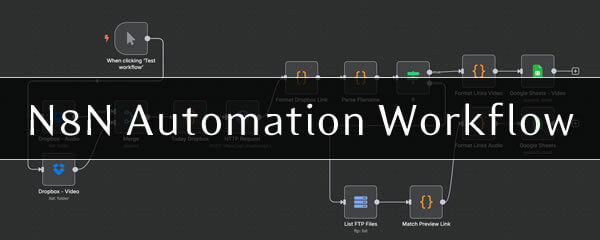
n8n is an automation platform that connects the tools you already use, such as your website, email, Google Sheets, Drive, and calendar, just to name a few. It lets you build simple workflows that handle repetitive tasks in the background. It’s quite simple to get started; although there’s a bit of a learning curve to learn the ins and outs.
There are other automation tools out there, like Make.com, that offer a gentler learning curve and more ready-made templates. But n8n is more comprehensive, more customizable, and has fewer limitations on what you can build.
I’ve used it to pull files from FTP folders and Dropbox, update Google Sheets automatically, and sort Google Drive documents based on user input and dynamic filters. I’m also working on a setup that grabs information from web sources and formats it into per-scheduled social media posts. This has been a major time-saver for batching content.
None of this replaces the human side of business. It simply removes the parts that no longer need to be done manually.
Where AI Fits In
AI can also be part of these workflows. It can help summarize content, draft responses, organize information, or detect patterns in data. What makes it especially useful is its flexibility. You can hardcode specific instructions into a workflow, feed them in dynamically depending on the task, or trigger them manually when needed. This kind of control makes automation more responsive and more useful in daily operations.
What You Can Automate
You don’t have to change how your business works. Automation connects the tools you already rely on and helps them work together more efficiently behind the scenes.
n8n works with a wide range of tools. Some common categories include:
- Email platforms (like Gmail or Outlook)
- File storage and document tools (Google Drive, OneDrive)
- Spreadsheets and databases (Google Sheets, Excel)
- Team collaboration tools (such as Microsoft Teams, Discord, or Telegram)
- Calendar and scheduling apps (Google Calendar, Microsoft Calendar)
- Web forms and submissions (Gravity Forms and others)
- Custom integrations using webhooks or APIs for tools without native support
- Lead generation (LinkedIn, social media and other sources)
This is just a small sample. There are hundreds of integrations available, and many ways to connect tools even when there isn’t a built-in option.
Many people assume automation is either too technical or already handled by the software they use. But there’s an entire layer of repetitive work that often gets missed. These are tasks that seem too small to build a system around, but over time they take up a lot of time.
Tasks You Might Not Realize Can Be Automated
Here are some examples of tasks that could be automated, even though most businesses still handle them manually:
Monitor competitors without constant checking
An automation can track specific websites, news sources, or public updates, then send a quick report with relevant changes straight to your inbox on a set schedule.
Automatically organize incoming files
Files sent by clients or team members, such as contracts, photos, or uploads, can be renamed, placed in the correct folder, and backed up based on who sent them or what they contain.
Clean and format data before it hits your system
Form submissions and spreadsheets often come in messy, with inconsistent capitalization, date formats, or duplicates. Automation can clean this up before anyone even looks at it.
Get alerts when something doesn’t happen
Not every task is about doing something. Sometimes the problem is that nothing happens. Automation can notify you if no new leads come in for a few days or if a scheduled task hasn’t been completed.
Back up shared working documents regularly
Live files such as spreadsheets or trackers can be automatically backed up at intervals, creating versioned copies so there is always a fallback.
Convert raw inputs into something usable
Whether it’s form entries, checklists, or submitted notes, automation can reformat them into structured data, formatted documents, or project folders. This reduces manual setup.
Generate weekly summary reports from multiple tools
Instead of manually gathering numbers or updates from five platforms, automation can collect the essentials and send a clean summary on a regular schedule.
Prepare content drafts from scattered inputs
If you collect links, ideas, or content throughout the week, automation can organize them into a pre-formatted layout for a newsletter, blog post, or content calendar.
Keep tools in sync behind the scenes
When your platforms don’t talk to each other, automation can bridge the gap and sync key updates so your data stays consistent across systems.
Use Automation to Generate Sales Leads
Automation can also help you find new leads. Tools like Apify can scrape sites like LinkedIn and collect useful details such as names, job titles, and company info.
You can set up a scraper to pull contacts based on industry, location, or role, then automatically format the data and import it into a CRM. From there, automation can even send a custom intro email to start the conversation.
This saves time and keeps your outreach consistent without the manual effort.
Final Thoughts
You don’t need to automate everything. But chances are, some of the tasks you’re doing manually could be removed from your plate and save you a significant amount of time.
If you find yourself repeating the same steps over and over; especially when it involves copying, saving, forwarding, renaming, or reminding; automation can probably take over.
If you’re exploring automation in your work or even just curious about it, drop a comment and let me know what you’ve been working on. I’d love to hear how others are using it.